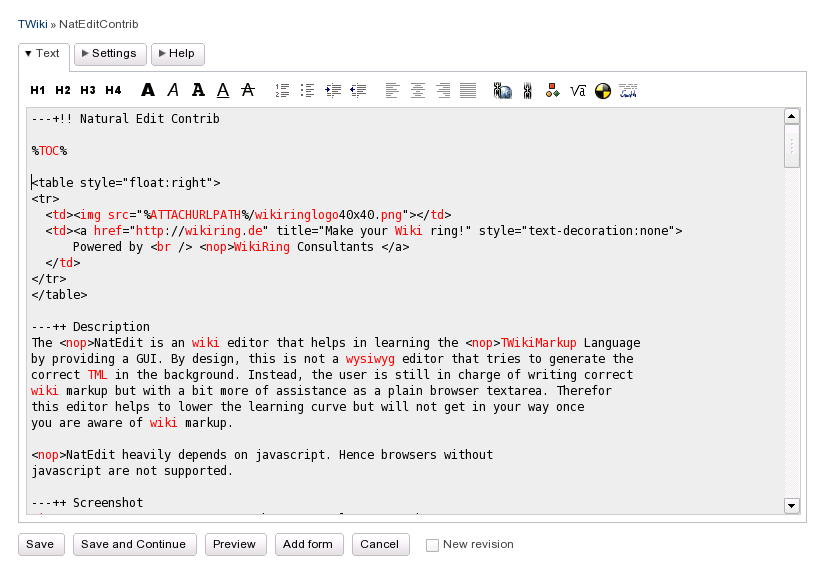
The NatEdit is an wiki editor that helps in learning the TWikiMarkup Language
by providing a GUI. By design, this is not a wysiwyg editor that tries to generate the
correct TML in the background. Instead, the user is still in charge of writing correct
wiki markup but with a bit more of assistance as a plain browser textarea. Therefor
this editor helps to lower the learning curve but will not get in your way once
you are aware of wiki markup.
NatEdit heavily depends on javascript. Hence browsers without
javascript are not supported.
Screenshot
Configuration
To enable the NatEditContrib add the identifier natedit to the SKIN
variable in TWikiPreferences or WebPreferences. So in case you are using PatternSkin
this is
* Set SKIN = natedit,pattern
Customization
Theming
The editor can be themed using CSS. The actual theme is set using the NATEDIT_THEME variable
which defaults to
* Set NATEDIT_THEME = default
This value determines the subdirectory under
/twiki/pub/TWiki/NatEditContrib which contains a styles.css file and a bunch
of button images. You can create a new theme "foo" by creating a CSS file
/twiki/pub/TWiki/NatEditContrib/foo/styles.css and setting
* Set NATEDIT_THEME = foo
See the default theme for the CSS classes used for the individual buttons.
Word theme
The Word theme for NatEditContrib uses not only a custom CSS style, but also a customisation of the icon order, and customised Help.
This is acheived through the use of the TWiki Template path - over-riding the original natedit edittoolbar, a natedit theme, and a custom help text topic.
Create new table can either be a static 3x3 table, or, If you install and enable JQueryPlugin, will use a popup dialog that lets the user choose the number of rows and columns.
* Set SKIN = word.natedit,natedit,pattern
* Set NATEDIT_THEME = word
* Set NATEDIT_HELPTEXT = TWiki.NatEditWordHelpText
Markup
All buttons produce a certain amout of TWiki markup or HTML inserting it at the current
position in the textarea. This can be configured to your needs using a set of
preference variables. Please add them to your TWikiPreferences or WebPreferences to
override the build-in defaults.
The NATEDIT_... variables have the format
'<open-tag>', '<sample-text>', '<close-tag>'
When the respective button is pressed, <open-tag><sample-text><close-tag>
will be inserted. If there's a current selection, then it will be used instead of the
<sample-text>.
<img src=\"%ATTACHURLPATH%/','Example.jpg','\" title=\"Example\" /> or %IMAGE{\"','Example.jpg','|400px|Caption text|frame|center\"}% when the ImagePlugin is installed
'<verbatim>\n','Insert non-formatted text here','\n<\/verbatim>\n'
NATEDIT_SUB
subscribed text
'<sub>', 'Subscript text' , '</sub>'
NATEDIT_SUP
superscribed text
'<sup>', 'Superscript text', '</sup>'
NATEDIT_TABLE
add table
creates new table
NATEDIT_NUMBERED
make into numbered point
3 spaces 1 space
NATEDIT_BULLET
make into bullet point
3 spaces * space
NATEDIT_INDENT
indent
adds 3 spaces
NATEDIT_UNDENT
un-indent
removes 3 spaces, or 3 spaces * space or 3 spaces 1 space
If you want to customize the help text in the bottom part of the editor then
set the variable NATEDIT_HELPTEXT to the name of a topic that contains
the help text. The default is
* Set NATEDIT_HELPTEXT = %TWIKIWEB%.NatEditHelpText
Installation Instructions
You do not need to install anything in the browser to use this extension. The following instructions are for the administrator who installs the extension on the server where TWiki is running.
Like many other TWiki extensions, this module is shipped with a fully
automatic installer script written using the BuildContrib.
If you have TWiki 4.2 or later, you can install from the configure interface (Go to Plugins->Find More Extensions)
There is a small set of browser based unit tests defined in NatEditContribJSUnitTests that can be run as a problem diagnosing tool. These require the installation of TWiki:Plugins.JSUnitContrib, and then can be run from Run all tests
Testing has been carried out using Safari, Firefox, Opera and Internet Explorer.
fixed calculation of textarea offset while autoresizing it to window height, fixed initialization not to use Behaviour anymore, fixed autohide/showing of word toolbar together with tinymce
08 Oct 2007
fixed word toolbar together with TinyMCEPlugin; fixed launching a popup by not relying on twiki's javascript; using css sprites instead of individual buttons
made all button output configurable; standardized their defaults; fixed javascript in preview mode; added support for TWiki:Plugins/RevCommentPlugin; added monospace button; reworked some of the icons
23 Apr 2007
fixed IE freezing on resizing the edit window
05 Apr 2007
added support for EditContrib and editform
04 Apr 2007
added css file; added monospace <-> propotional font toggles; made signature text customizable; minor refactoring of the javascript; removed non-standard tags FORMATLIST and IFDEFINED
03 Apr 2007
added NATEDIT_HELPTEXT variable; be backwards compatible to PatternSkin (TWiki-4.1.2)