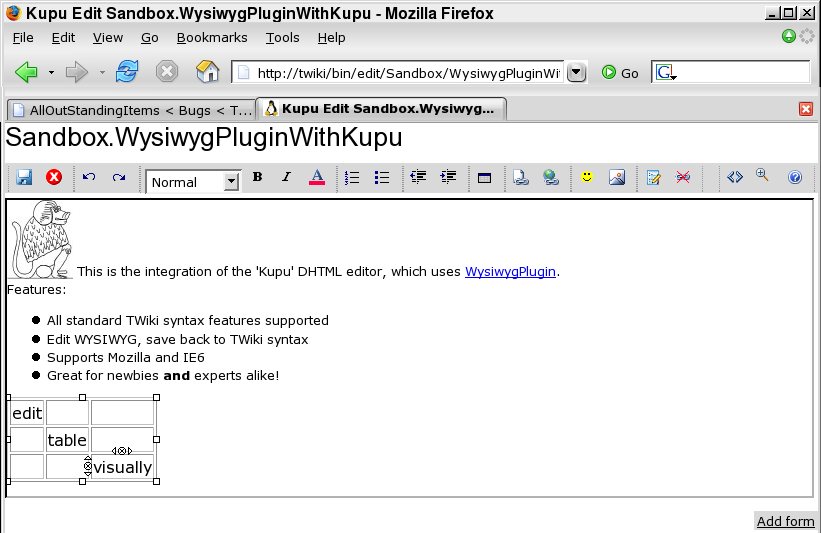
The integration uses the TWiki:Plugins.WysiwygPlugin to translate text to and from a format that Kupu can edit.
Caveat: KupuContrib is designed for editing TWiki topics, not as a general purpose HTML editor. It will work fine on topics that contain text, TML formatting, and most HTML. However, because of the complexity of transforming TML into HTML and back, complex TML, and mixing HTML and TML may not give the results you expect. You are recommended to use the standard browser textarea editor for editing existing topics that contain mixed HTML and TML, or complex %TML%-type variables.
How to use the editor
Basic help for most of the functions in the toolbar is available by "hovering" the mouse over the button.
Some functions require a bit more explanation:
"Insert No-Op" inserts a <nop> region. Any TWiki syntax such as wikiwords or variables inside the region will be disabled in the rgeion. $lt;nop> regions may not extend over line breaks.
The rightmost drop-down will give you a menu of TWiki variables that can be inserted. Any of these variables can be edited after they have been placed in the text, for example to add parameters.
"Insert a WikiWord" will give you a menu of topics in the current web that can be inserted. Topics are inserted as links, though typing wikiwords in plain text will work just as well.
Watch out for the <> button on the right of the toolbar. It lets you switch into an HTML view, which can be very useful when you can't get your formatting right.
In TWiki, a totally empty table cell causes the cell to be merged with the cell immediately to the left. To make this effect more transparent in the editor, these empty cells are shown with the text "%SPAN%" in them. In Kupu, if you add %SPAN% to a table cell, then all the rest of the content will be thrown away and the cell will be converted to an empty table cell. Note that this only applies to tables that are converted to TWiki syntax.
Kupu Notes
The version of Kupu shipped with this plugin is an uncustomised basic Kupu release. All the TWikification is done as plugins and extensions to Kupu - the basic kupu code is shipped completely intact.
Installation Instructions
You do not need to install anything in the browser to use this extension. The following instructions are for the administrator who installs the extension on the server where TWiki is running.
Like many other TWiki extensions, this module is shipped with a fully automatic installer script written using the BuildContrib.
If you have TWiki 4.1 or later, and Perl 5.8, you can install from the configure interface (Go to Plugins->Find More Extensions)
The webserver user has to have permission to write to all areas of your installation for this to work.
If you have a permanent connection to the internet (and Perl 5.8), you are recommended to use the automatic installer script
Just download the KupuContrib_installer perl script and run it.
Notes:
The installer script will:
Automatically resolve dependencies,
Copy files into the right places in your local install (even if you have renamed data directories),
check in new versions of any installed files that have existing RCS histories files in your existing install (such as topics).
If the $TWIKI_PACKAGES environment variable is set to point to a directory, the installer will try to get archives from there. Otherwise it will try to download from twiki.org or cpan.org, as appropriate.
(Developers only: the script will look for twikiplugins/KupuContrib/KupuContrib.tgz before downloading from TWiki.org)
If you don't have a permanent connection, you can still use the automatic installer, by downloading all required TWiki archives to a local directory.
Point the environment variable $TWIKI_PACKAGES to this directory, and the installer script will look there first for required TWiki packages.
$TWIKI_PACKAGES is actually a path; you can list several directories separated by :
If you don't want to use the installer script, or have problems on your platform (e.g. you don't have Perl 5.8), then you can still install manually:
Download and unpack one of the .zip or .tgz archives to a temporary directory.
Manually copy the contents across to the relevant places in your TWiki installation.
Check in any installed files that have existing ,v files in your existing install (take care not to lock the files when you check in)
Manually edit LocalSite.cfg to set any configuration variables.
Run configure and enable the module, if it is a plugin.
Repeat from step 1 for any missing dependencies.
Do not forget to enable the WysiwygPlugin in configure or it won't work.
To enable the editor in one of your skins, add the following link to the skin alongside or in place of the existing 'edit' link: <a href="%SCRIPTURLPATH%/edit%SCRIPTSUFFIX%/%WEB%/%TOPIC%?skin=kupu">Kupu</a> As you can see this is just a standard edit link with the 'kupu' skin in place of the usual edit skin. Here it is for this topic: Kupu. Try clicking on it, but do not save!
If you are using TWiki-4.0.0 or later with pattern skin, the %COMPOSER% global TWiki variable is used to control the skin used for the WYSIWYG editor link. You can define this variable to the empty string to disable WYSIWYG editing on a site, per-web, per-user or per-topic basis. Set COMPOSER to kupu to enable this module.
Other Settings
See also: WysiwygPlugin for other settings that affect this contrib. Note
especially the WYSIWYGSKIN, which should be set to kupu for this contrib
to work correctly.
The editor template includes a number of files that can be used for other settings. These files are not included in the distribution, so that you can easily create your own local content.
TWiki.WysiwygPluginIcons
You can define a list of icons that will be available in the Kupu editor when the toolbar button is pressed. This topic has to contain a list of <IMG> tags. If present, the 'alt' text will be used in place of the <IMG> tag when translating from HTML to TML. Example:
You can also define a list of strings that will be available for insertion in topics using the toolbar button. This topic has to contain a list of HTML 'option' tags. Example:
<option value='-- <nop>%WIKIUSERNAME% - %DATE%'>Signature</option>
<option value="%<nop>WIKINAME%">Wiki name (variable)</option>
<option value='%<nop>SEARCH{"search for"}%'>Inline search (variable)</option>
<option value='%<nop>INCLUDE{"topic or url"}%'>Include (variable)</option>
<option value="%<nop>TOC%"> Table of Contents (variable)</option>
<option value="%<nop>TOPIC%">Topic (variable)</option>
<option value="%<nop>WEB%">Web (variable)</option>
<option value="%<nop>DATE%"> Date (variable)</option>
The bit between the > < value defines text in the drop-down box in the editor, and the value defines the actual string inserted in the topic.
TWiki.WysiwygPluginLocalHelp
If it exists, the contents of this topic will be included and shown on the edit screen below the status bar. It is intended to be used for site-specific quick help information.
Known problems
Can't undo all functions (Kupu + browser)
Due to limitations in the browser support for editing, not all functions can be undone. Also, the undo buffer can be cleared unexpectedly during editing, especially when using Internet Explorer.
Because of limitations in the browsers, the editor does not support PRE blocks. All PRE blocks will be converted to TWiki verbatim blocks on save. This can cause some confusion, especially when editor formatting controls (such as "bold") have been used to format text in a PRE block. Users are advised to use only plain text in PRE (verbatim) blocks.
No Safari support
Kupu does not work on Safari.
Contrib Info
This contrib is heavily based on the TWiki::Plugins.KupuEditorAddOn, and the authors of that add-on are therefore also credited as authors of this plugin.
Item1890Item1041Item944 Much more aggressive cleanup of HTML pasted in from external sources. Excessively verbose HTML (e.g. from Outlook) was causing apparent infinite looing behaviour.
8867
Item1176 commented out Cairo version of header handler
8780
Item1625 disable expansion of twiki variables in urls where there are other twiki variables that can't be expanded
8779
Item1530 support for templatetopic when editing new topics
8592
Item1532WysiwygPlugin: Added two more do-not-edit-if-topic-contains parameters, pre+comments
8590
Item1532WysiwygPlugin: Kenneths suggestion on proper handling of HTML comments (incl. change to kupu)
8572
Item1529 evil, evil. The XMLSerializer in IE isn't happy serializing the DOM. I have no idea why. Kupu manages to get away with this because it passes the DOM through the XML validator, which I had to disable because it strips comments. So, for now, the IE implementation will strip comments - but at least you can save again
8538
Item1501 table handling was a bit spazzy. Several problems fixed.
8535
Item1518 moved icon and string lists into topics, updated screenshot
8531
Item1392 reversed the sense of the navigate-away condition, again
8466
Item1486 added WYSIWYG_EXCLUDE to allow exclusion of 'uneditable' content
8463
Item1486 was stripping comments, wrongly. Had to disable the kupu filters completely, they just do too much damage.
8401
Item1457 corrected problem with bullet list at top of topic
8388
Item1445 fix for a javascript error, introduced by previous fix
Item1231 added %SPAN% to indicate a spanned-over cell in the editor. Improved handling of HTML in verbatim tags by inserting line breaks is the tag type calls for it, before removing the HTML.
8276
Item1215 added WYSIWYG_ICONS and WYSIWYG_TAGS to support user customisation of icon images and twiki variables that can be inserted
8274
Item1314 debugging in case the hang happens again; and made sure to default the editor just in case
8273
Item1315 short forms must be terminated by one of the same characters that terminate wikiwords
8272
Item1391 added special interpretation of IMG tags to expand selected TWiki variables within SRC attributes
Item1311 removed excess space inserted in headings
8269
Item1339 changed from using arbitrary attribute for notoc to a new CSS class. Arbitrary attributes are stripped by Kupu before save.
8268
Item1344 strip ^Ms inserted by Sarissa during serialisation on IE
8267
Item1394 still can't get text styles to work properly in IE; but I am now firmly of the opinion that the fault lies with the browser, and not with Kupu.
Item1317 support for limited case of nopped variable
8104
Item1320 corrected interpretation of relative URL path in [[]]
8091
Item1259 changed comment handling; rather than trying to create HTML, which gets munged, create an HTML comment. This will only be editable by switching to source view, but hey, it's supposed to be WYSIWYG. Note that this also means that comments in pasted HTML should be retained now
Item1189 reverting accidental checkin of experimental code
7903
Item1189 filter whitelist is not good enough; need to generate B and I nodes. templates/ pub/TWiki/WysiwygPlugin
7902
Item1189 it took bloody ages to track down, but finally discovered that bold and italic were being filtered out of spans by Kupu 1.3.2.... too smart for it's own good. So added them to the filter whitelist, and it works again.
7873
Item1189 added pre save filter to try and find where the attributes are disappearing to in FF
7872
Item1187 for lack of an s on an RE, the nation was lost (well, the multi-line comment actually). Thanks Kenneth!
7871
Item859 solved issue with non-display of inserted images. Was due to the use of an onSubmit handler to close the dialog, rather than an onLoad handler triggered when the IFRAME that contains the result is loaded.
7869
Item1172 had to rewrite big chunk of the table popup to get it working with 1.3.2
7858
Item1151 rewrote link handlings stuff to leverage browser better
Item1155 added extra recursion block, as Item1155 suggests it is needed
7801
Item1042 All sorts of clever tricks to handle expansion/compression of a subset of TWiki variables when they are used in URLs. Not a complete solution, but better than it was.
7799
Item1024 caught out by recursive call to beforeCommonTagsHandler in Cairo (nasty)
Item340 re-initialisation bug found by ColasNahaboo? when using mod_perl; fixed by correctly re-initialising the parse stack for each run of the convertor
Item335 Switched PNGs to indexed mode, as transparency doesn't work on IE for RGB images
6238
Item332 Added context identifier to WysiwygPlugin, and a button to the pattern view template. If WysiwygPlugin is enabled, then the button will appear. Neat, huh?
6195
Item196 getting plugin test suites to pass. Doesn't mean the plugins actually work, just that the test suites run (which is a good indicator)